
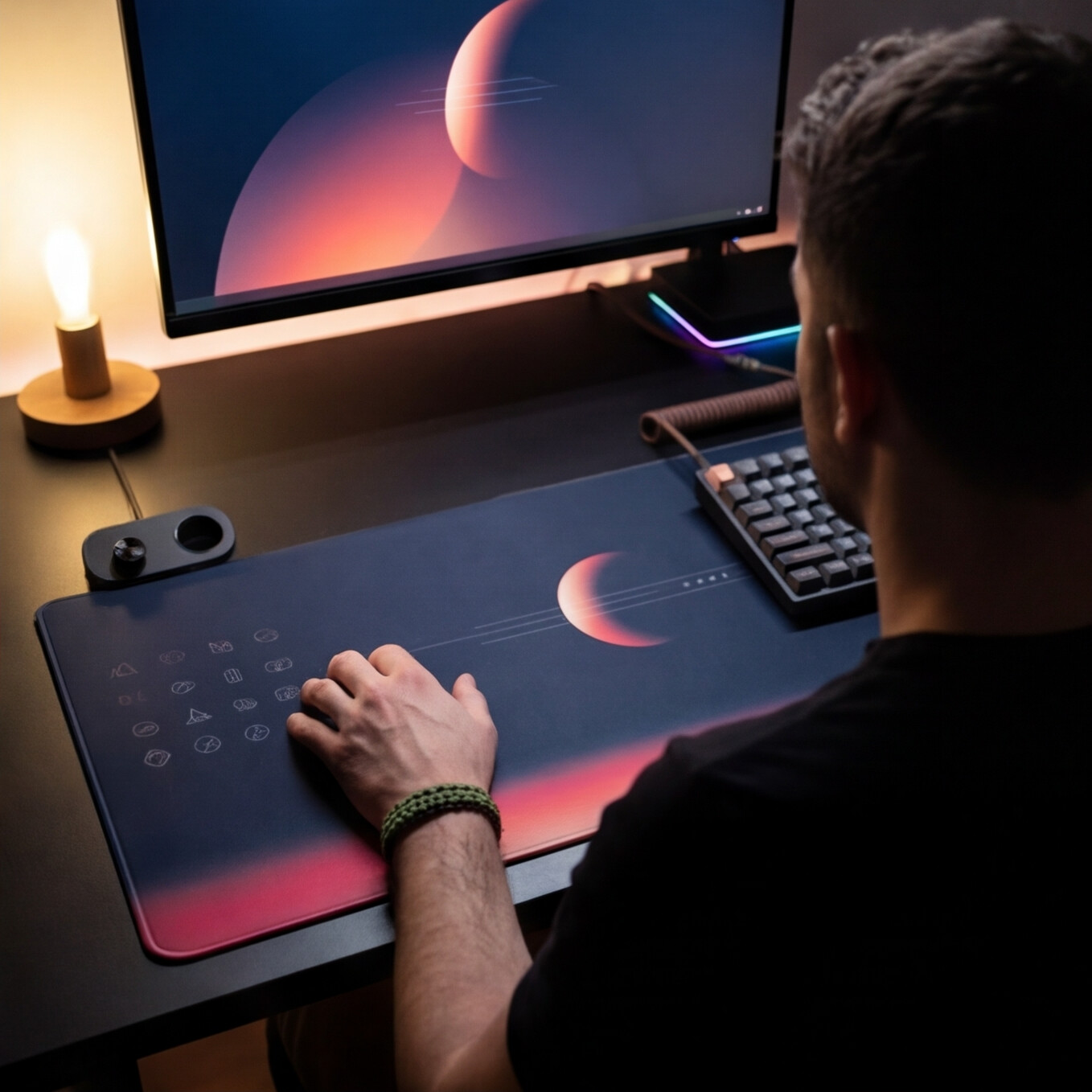
The problem with most desk setups is not lack of power. It is fragmentation. Your mouse sits on one surface. Your keyboard handles another layer. Then the extras start piling up – macro pads, stream controllers, media knobs, side panels. Every device promises speed. Every device takes space. A mousepad control surface changes that equation by turning the area under your hand into active input.
That matters because the mousepad is already prime real estate. Your hand rests there for hours. It is one of the few surfaces in a setup that is always in reach, always centered, and almost never doing more than helping the mouse glide. Once that surface can register intentional pressure and trigger actions, the desk starts behaving like a system instead of a collection of accessories.
What a mousepad control surface actually is
A mousepad control surface is a mousepad or desk mat with built-in interactive zones that respond to touch or pressure. Instead of reaching for a separate controller, you press defined areas on the pad itself to trigger shortcuts, macros, media commands, or application-specific actions.
The core idea is simple. Keep the hand where it already works. Move control closer to the flow. Remove one more object from the desk.
That does not mean every implementation feels the same. Some concepts lean closer to touch input. Others focus on pressure sensitivity so accidental triggers are less likely. That distinction matters. A control surface has to stay invisible when you do not need it and immediate when you do. If it interrupts tracking, adds visual noise, or fires by mistake, it fails the whole premise.
Why the mousepad is the right place for control
Most peripherals ask you to adapt to them. A good mousepad control surface does the opposite. It adapts to a habit you already have.
Your dominant hand already moves, settles, and applies pressure in that area thousands of times a day. That makes the mousepad a uniquely efficient place for secondary commands. You are not learning a whole new interaction zone across the desk. You are extending the function of a familiar one.
For gamers, that can mean binding non-critical actions, ping systems, push-to-talk, build swaps, or inventory shortcuts without overloading the keyboard. For editors, it can mean timeline controls, blade cuts, undo, ripple delete, or playback commands. For streamers, scene switching and audio control become faster. For developers, window management, run commands, and workspace switching stay close at hand.
The win is not just speed. It is reduced interruption. Every time you break position to hit another device, you introduce friction. Tiny delays stack up. Attention drifts. A surface-based input model cuts that drift down.
Mousepad control surface vs. macro pad
A macro pad is still useful. It gives you visible keys, tactile certainty, and often deep programmability. But it also asks for desk space, cable management, and a permanent footprint. If your setup is already packed with audio gear, chargers, controllers, and notebooks, one more box is not a small ask.
A mousepad control surface solves a different problem. It hides functionality inside an object that already belongs on the desk. The control layer is present without becoming visual clutter.
That trade-off comes with nuance. A macro pad is better when you need lots of labeled commands, frequent remapping across many apps, or obvious physical feedback. A mousepad control surface is better when you want fast access to a focused set of actions without adding another visible device. One is explicit. The other is embedded.
For a lot of users, especially those building cleaner battlestations or streamlined workspaces, embedded control is the more modern answer.
What makes a good control surface feel usable
The concept is easy to understand. The execution is harder.
First, the surface still has to be a good mousepad. Tracking quality is not optional. If the texture fights the sensor or the material wears poorly, no amount of smart input will save it.
Second, activation has to be intentional. Pressure-based zones are compelling because they create a clearer threshold than casual contact. Your palm resting naturally should not trigger commands. Your hand leaning with purpose should.
Third, setup has to stay light. No one wants a peripheral that requires software babysitting just to do basic actions. Browser-based configuration and plug-and-play behavior make more sense here than bloated desktop suites. The product should feel like it joins the setup quietly.
Fourth, modes matter. A control surface becomes far more useful when it can shift profiles between gaming, editing, streaming, and general work. The same physical zone can mean play/pause in one context and mute mic in another. That is where the surface stops being a novelty and starts acting like infrastructure.
The clean desk advantage
A lot of hardware talks about productivity while ignoring what the desk actually feels like. Space is part of performance.
Clutter creates drag. Extra devices force awkward reaches. Cables pull attention. Even visually, too many control objects make a setup feel busier than it needs to be. A mousepad control surface reduces that density by consolidating function into a surface already doing a job.
This is why the category has appeal beyond gaming. Designers want room for tablet movement and reference notes. Video editors need clean access to tools without turning the desk into a cockpit. Developers often prefer minimal setups that still move fast. Music producers have enough gear fighting for surface area already. In all of those cases, invisible control makes sense.
That is the strongest argument for the category. Not more hardware. Better placement of hardware logic.
Who benefits most from a mousepad control surface
The best fit is someone who already values shortcuts and setup efficiency but does not want another dedicated control box. If you are the type of user who maps side mouse buttons, custom keyboard layers, or app macros, this idea will click quickly.
It is especially strong for hybrid users. Someone who games at night and edits during the day gets more value from a surface that can switch roles than from a single-purpose accessory. The same applies to streamers who need controls near the hand but do not want more gear crowding the camera frame.
It may be less essential for users with very simple workflows. If you mainly browse, answer email, and do light office tasks, the benefit is real but smaller. A control surface shines when repeated actions are frequent enough to justify keeping them one press away.
Where this category is heading
The larger shift is not just smarter mousepads. It is ambient input.
We are moving toward peripherals that do more without looking like more. That means controls embedded in surfaces, context-aware layouts, lighter configuration, and less visible hardware overhead. The best products in this space will not scream for attention. They will disappear into the setup and make everything around them feel tighter.
That is why a product like KAGE GhostPad stands out. It does not treat the mousepad as decoration. It treats it as underused interface territory. A 4×4 pressure-sensitive grid, mode switching, browser-based setup, and no-install behavior point toward a cleaner model of control: powerful, close at hand, and visually quiet.
What to look for before you buy
Do not judge a mousepad control surface on concept art alone. Ask practical questions.
How many zones are actually usable without forcing awkward hand movement? Can you configure them quickly? Does the pad remain comfortable during long sessions? Will accidental inputs be a problem in your grip style? Can it switch between work and play without friction?
Also consider whether you want hidden control or explicit feedback. Some users will always prefer visible keys. Others will take minimalism and preserved desk space every time. Neither choice is wrong. It depends on whether your priority is command density or command invisibility.
The right answer usually comes down to workflow. If your desk already feels crowded and your hand is constantly traveling to secondary controls, the mousepad is no longer just a surface. It is the missing layer.
Good hardware earns its place by removing friction, not adding spectacle. A mousepad control surface gets that right when it fades into the setup, stays out of the way, and gives you one more command exactly where your hand already is. That is not a gimmick. That is better interface design.
Leave a Reply